GeM bidding process: a step-by-step guide for sellers
A plain-English walkthrough of bidding on the Government e-Marketplace, from registration to submission, plus the mistakes that disqualify first-timers.
The first GeM bid most people submit gets rejected on a technicality. Not on price — on a missing document, a wrong checkbox, an EMD that wasn’t arranged in time. The platform isn’t trying to trip you up, but it assumes you know the rules, and nobody hands you the rules.
So here’s the GeM bidding process the way I wish someone had explained it to me. In order, with the parts that actually matter.
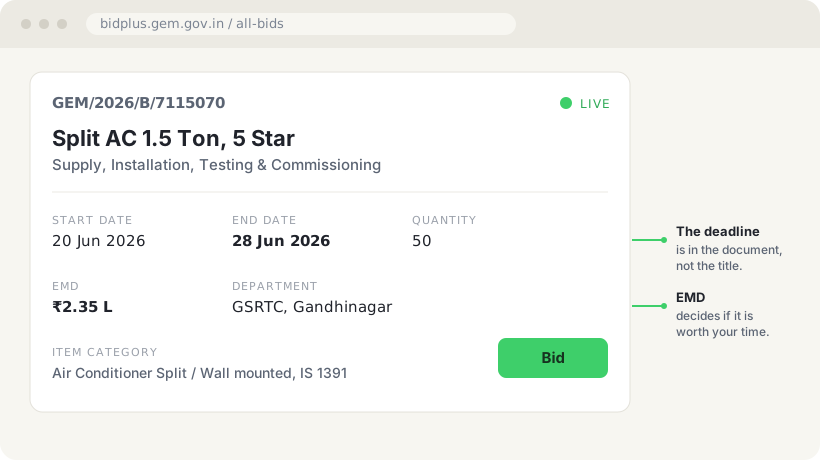
A typical GeM bid. The deadline and the EMD are the two fields that decide whether it’s worth your time.
Step 1: Register as a seller
You register on gem.gov.in as a seller using your business details, PAN, GST and a bank account in the business name. Keep these consistent. (I’ve covered the full setup in the GeM seller registration guide if you haven’t done this part yet.)
The single most common early problem is a mismatch between the name on your PAN, your GST and your bank account. GeM is strict about this because payments and verification depend on it.
If you’re an MSME, get your Udyam registration done and linked. It unlocks real benefits later — I’ll come back to this.
Step 2: Understand the two ways to sell
On GeM you can sell in two ways, and people confuse them.
The first is the catalogue (direct purchase). You list your products, and buyers below a certain value can buy directly or run a small comparison. This is closer to selling on an e-commerce site.
Under GFR Rule 149, a buyer can order up to ₹50,000 from any seller who meets the need. Between ₹50,000 and ₹10 lakh, they must buy from the lowest-priced seller after comparing products from at least three manufacturers. Above ₹10 lakh, a bid or reverse auction is compulsory.
The second is bids and reverse auctions. For larger requirements, buyers float a bid and multiple sellers respond. This is the “tender” side of GeM, and it’s where most serious volume sits.
This guide is about the second one, because that’s what people mean when they say “GeM tenders”. If you want the catalogue side too, the GeM seller playbook covers both.
Step 3: Find a bid you’re actually eligible for
When a bid is published, open the bid document before you get excited. You’re checking four things:
- The exact item and specification. Does your product meet every line? GeM bids often quote an IS standard. If the bid says ISI marked to IS 1391 and your product isn’t, you’re not eligible, full stop.
- Eligibility conditions. Turnover, past experience, OEM authorisation. Many bids ask for an average annual turnover or a past supply of similar value. If you don’t meet it, don’t bid. (There’s a fuller breakdown in tender eligibility criteria explained.)
- Quantity and delivery. Can you actually deliver this quantity, to this location, in this timeline?
- The financials. EMD, ePBG, and whether seller-side charges make the price unworkable.
Most bids will fail one of these for you. That’s normal and good. It saves you time.
Step 4: Arrange the EMD
EMD is the earnest money deposit, a refundable amount you submit to show you’re serious. GeM calls it bid security.
Bids under ₹5 lakh have none. Above that, the buyer sets the amount in the bid, and GeM’s terms suggest 1% of the estimated value, within a range of 0.5% to 5%. Don’t confuse it with the ePBG, which is the performance guarantee you give only after you win. (If those acronyms are new, I’ve unpacked EMD, ePBG and the related terms separately.)
Here’s the MSME point I promised: micro and small enterprises with a valid Udyam registration are exempt from EMD, as long as they make the product or provide the service. Traders are not covered. MSEs also get purchase preference. If you’re an MSE and you haven’t linked your Udyam, you’re leaving a real advantage on the table. Read the bid carefully for how it treats MSEs, because the benefit only applies if you claim it correctly.
Arrange this early. EMD is where timing kills people. A bank guarantee is not instant.
Step 5: Prepare and upload your bid
You’ll fill in the technical bid and the financial bid. The technical bid is where you prove eligibility: upload the documents the bid asks for, in the format it asks for, named clearly. The financial bid is your price.
A few hard-won rules:
- Upload exactly what is asked, nothing missing. A single missing mandatory document disqualifies you regardless of your price.
- Match the specification claim to a document that proves it. Don’t just tick “yes, ISI marked”. Attach the certificate.
- Quote a price you can actually honour. GeM contracts are enforceable, and a price you can’t supply at is worse than not winning.
Step 6: The reverse auction (if there is one)
For many bids, after technical evaluation, the qualified sellers go into a reverse auction. Depending on the rule the buyer picks, that is either the cheaper half of them or everyone except the highest bidder. The lowest bidder so far is L1, and others can revise downward to compete.
Two things to know. First, you only get to the auction if you cleared the technical stage, so the documents come first. Second, decide your floor price before the auction starts. Reverse auctions are designed to push prices down. Going in without a hard floor is how businesses win contracts they lose money on — I’ve written a fuller reverse auction strategy for GeM if this stage is where you keep bleeding margin.
Step 7: Award and delivery
If you’re L1 and technically qualified, you normally get the contract, though MSE and Make in India purchase preference can move part of the order to another seller. If the bid asks for an ePBG, submit it within 15 days of the award, because payment isn’t due until the buyer has it. Then it becomes an execution problem: supply on time, to spec, get inspected, get paid. A clean delivery record on GeM is an asset. It makes future bids easier.
The mistakes that get first-timers out
Let me compress years of watching this into a short list:
- PAN, GST and bank name don’t match. Fix before you bid.
- Bidding on items you’re not eligible for, ignoring the IS standard or turnover clause.
- Treating the title as the spec. The PDF is the spec.
- Leaving EMD to the last day.
- Missing one mandatory document.
- No floor price going into the reverse auction.
None of these are about being a bad supplier. They’re about not knowing the rules of the platform. (The same pattern holds beyond GeM — most tender rejections are process failures, not product failures.) Once you’ve done three or four bids, this becomes routine.
The honest hard part isn’t the process. It’s finding the right bids early enough to prepare a clean response. I’ve written separately about that, because it’s the difference between bidding well and scrambling.
If you’d rather have the relevant GeM bids for your category and state arrive on your phone instead of hunting for them, that’s exactly what we built TrackTender to do.
Frequently asked questions
Why do most first GeM bids get rejected?
Most first bids are rejected on a technicality rather than on price — a missing document, a wrong checkbox, or an EMD that wasn't arranged in time. The platform assumes you already know its rules.
What are the two ways to sell on GeM?
You can sell through the catalogue (direct purchase), where you list products and buyers below a certain value buy directly, or through bids and reverse auctions for larger requirements. The bids side is the tender side, and it's where most serious volume sits.
What is EMD on GeM?
EMD (bid security) is a refundable deposit that shows you're serious. GeM bids under ₹5 lakh carry no EMD; above that, the buyer sets the amount, usually 0.5% to 5% of the estimated value, and pays it back after the bid. ePBG is different: it's the performance guarantee the winner gives after the award. MSE manufacturers and service providers, DPIIT-recognised startups and a few other categories are exempt from EMD.
Do MSMEs get any advantage when bidding on GeM?
Yes. Micro and small enterprises that manufacture the product or provide the service are exempt from EMD and get purchase preference: an MSE quoting within 15% of a non-MSE L1 can win part of the order if it agrees to match the L1 price. Traders don't get the EMD exemption. The benefit only applies if you've linked your Udyam registration and claim it correctly in the bid.
What is a reverse auction on GeM?
When the buyer turns it on, the technically qualified sellers go into a live auction after technical evaluation and keep cutting their prices. The lowest price so far is L1. Depending on the rule the buyer picks, either the cheaper half of the qualified sellers or everyone except the highest bidder (H1) gets in, and you only get there if you cleared the technical stage.
What mistakes get first-time GeM sellers disqualified?
The common ones: PAN, GST and bank name not matching, bidding on items you're not eligible for, treating the title as the spec, leaving EMD to the last day, missing one mandatory document, and having no floor price for the reverse auction.